Have a need to drop a small device on my fathers network to transfer movies and pictures that I’ve been digitizing here at home. Used to have an older intel Atom device (yeah… I know) sitting on a shelf in his basement but its outlived its usefulness.
Enter this Asus Chromebox 5, I picked up 2 with the idea that I’d use them to view media on my TV’s but that didn’t work out, so I ended up taking one and flashing it with Mr. Chromebox and it happily ran linux for a while.
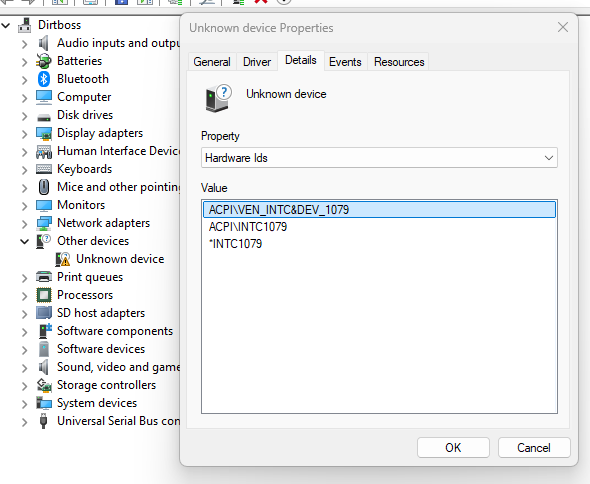
but now, I’ve purchased a copy of Windows 11 to put on it to serve a good purpose. I’ve been able to track down every driver except one.
an unknown device, I’ve searched and downloaded dozens of intel drivers, intel management drivers, chipset etc etc and even trying out Snappy Driver Installer Origin with no success.
Any help would be appreciated, the only real side effect I’ve found so far is that shutting down the device puts in to sleep / standby instead of a shutdown.
ACPI\VEN_INTC&DEV_1079 is the Hardware ID