System Details
- Device: [Asus Chromebox 4 (Duffy)]
- OS: [Windows]
- Firmware Type: [UEFI Full ROM]
- Firmware Version: [Latest]
- Internal storage type: [NVMe]
Summary of the Issue
Undervolt blackscreen
Steps to Reproduce
-
Go to bios
-
Enable undervolt
-
Set Cpu and gpu undervolt to 100
Expected Behavior
Blackscreen hdmi input shows but no bios js stuck blackscreen
Tried reseting cmos battery 20-30 mins remove and tried again still nothing
Any more ways to reset bios?
It blinked once when i try to power it on also can i use wson 8 pogo probe programmer 6.5 spacing or 8.5 spacing?
sure if you have that. just clear the SMMSTORE region:
sudo flashrom -p <programmer> -E --fmap -i SMMSTORE
Planning to buy one what should i buy the 6.5 spacing or the 8.5 spacing?
And when i try to boot to the system even it does not give power to my keyboard any troubleshooting tips maybe. i just remove the wrong cmos battery for this model
no idea, I don’t have a device for reference. buying or making a SuzyQ would be easier IMO.
the CMOS battery has no effect on the UEFI NVRAM. Not sure why you think removing it will do anything.
So this is not a normal pc when u remove cmos battery it doesn’t reset nvram or bios???
It’s hard to find a Suzy Q in the Philippines, and I don’t have the parts to build one. Since they’re so rare in my country, it’s better to just buy the programmer and the probe.
sorry about that, I will look into implementing a CMOS reset
1 Like
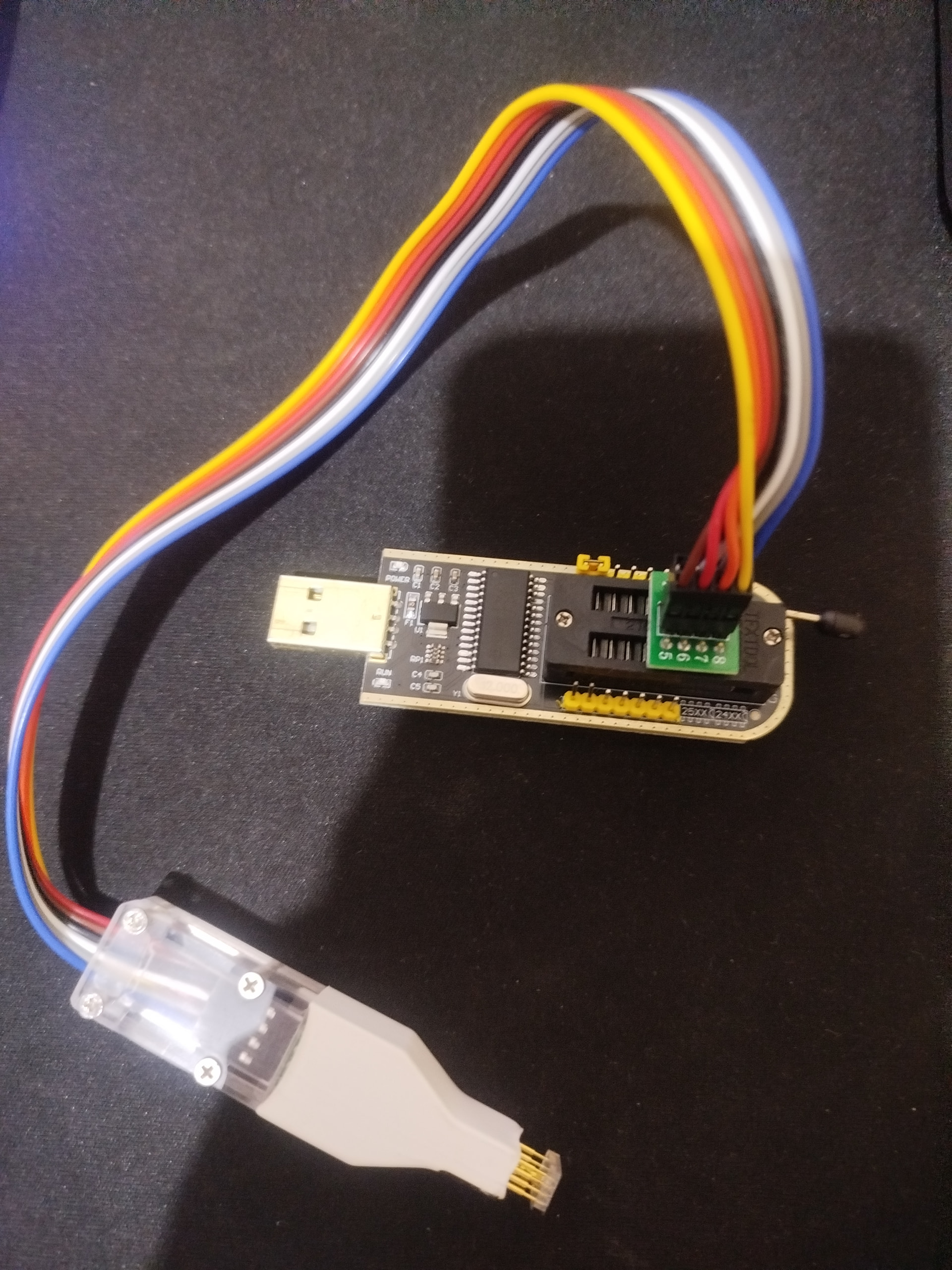
I’m preparing to flash my Asus Chromebox 4, and my pogo pin probe just arrived. Before I start, I want to confirm the BIOS chip voltage.
Is the chip on this model 1.8V or 3.3V? Is there a specific marking on the board or a part number I should look for to verify this myself? And i also ordered a 1.8v adapter incase its a 1.8v for the CH341A programmer
sudo flashrom -p <programmer> -E --fmap -i SMMSTORE
when i try to do this it show this when flashing on the chip
mint@mint:~$ sudo flashrom -p ch341a_spi -E --fmap -i SMMSTORE
flashrom unknown on Linux 6.8.0-51-generic (x86_64)
flashrom is free software, get the source code at https://flashrom.org

Using clock_gettime for delay loops (clk_id: 1, resolution: 1ns).
Couldn't open device 1a86:5512.
Error: Programmer initialization failed.
can’t connect to programmer = 99% you’re connected incorrectly. take the probe off the chip and see if same error. If so, then OS can’t see programmer. If no error, then wiring/orientation is wrong
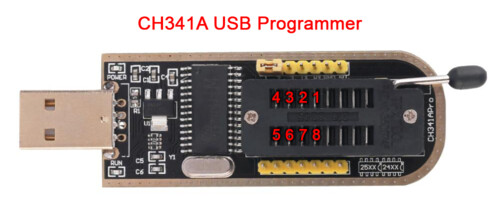
no, you’re using the wrong pins on the ch341a. There’s a pic on my site showing the correct ones to use!
i already tried doing that and it shows this error
mint@mint:~$ sudo flashrom -p ch341a_spi -E --fmap -i SMMSTORE
flashrom unknown on Linux 6.8.0-51-generic (x86_64)
flashrom is free software, get the source code at https://flashrom.org

Using clock_gettime for delay loops (clk_id: 1, resolution: 1ns).
Couldn’t open device 1a86:5512.
Error: Programmer initialization failed.
again, perform the test I stated above, it tells you where the problem is
when the probe is removed
mint@mint:~$ sudo flashrom -p ch341a_spi -E --fmap -i SMMSTORE
flashrom unknown on Linux 6.8.0-51-generic (x86_64)
flashrom is free software, get the source code at https://flashrom.org

Using clock_gettime for delay loops (clk_id: 1, resolution: 1ns).
Couldn’t open device 1a86:5512.
Error: Programmer initialization failed.
when the probe is connected to the chip
mint@mint:~$ sudo flashrom -p ch341a_spi -E --fmap -i SMMSTORE
flashrom unknown on Linux 6.8.0-51-generic (x86_64)
flashrom is free software, get the source code at https://flashrom.org

Using clock_gettime for delay loops (clk_id: 1, resolution: 1ns).
Couldn’t open device 1a86:5512.
Error: Programmer initialization failed
.