Pujjo HWID disappeared and firmware script shows it as an unrecognized device

System Details

  • Device: pujjo
  • OS: Linux (Xubuntu 26.04 LTS)
  • Firmware Type: UEFI Full ROM
  • Firmware Version: MrChromebox-2603.2 (5/17/2026)
  • Internal storage type: eMMC

I first noticed this issue when my Chromebook decided to give me the “no bootable device found” error when I tried to turn it on one day. I went into the BIOS (or, well, the equivalent in this case) and in the menu I noticed instead of my board name it read “Google No”. I tried booting again and it worked, and ran the firmware utility script and got some alarming results, attached in the image.
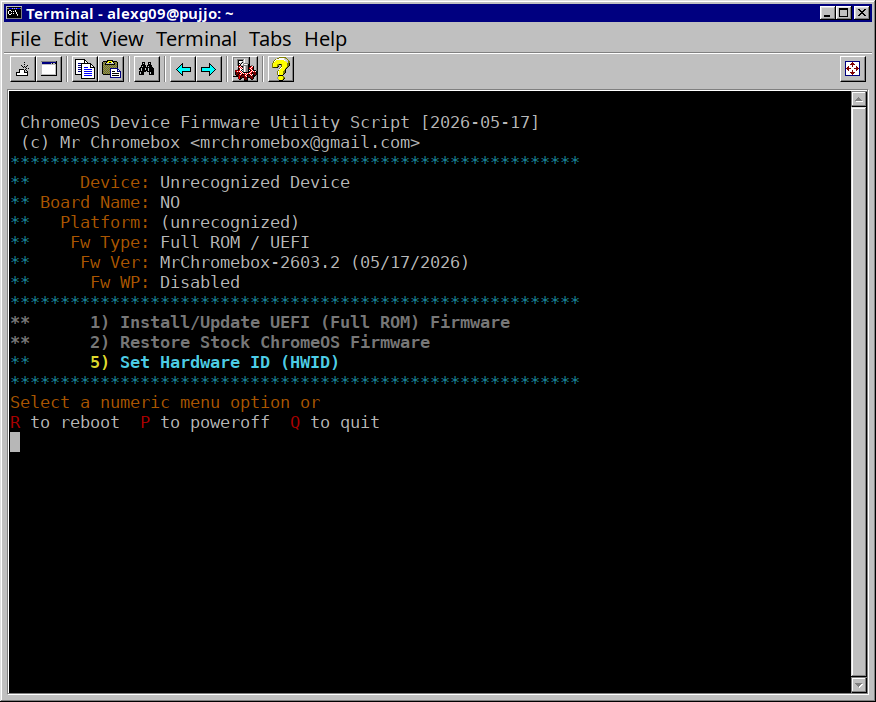
I do have backups of the stock firmware and the current firmware, but the script wouldn’t let me flash anything without manually setting a HWID and I was afraid to screw something up so I just quit.

I also have a log file, which I’ll link here:

TL:DR, eMMC issues that turned into an issue with the hwid, if someone can help with one or both issues it would be greatly appreciated :folded_hands:

extract the HWID from your stock backup, then use the script to set it, reboot

(after running script, in another terminal)

/tmp/gbb_utility --get --hwid /path/to/stock_backup.rom

That fixed the missing HWID, but I’m still having issues booting from eMMC, seemingly at random. If the issue occurs, I just shut off the Chromebook and wait for about ten seconds and then turn it on again, that usually allows me to boot, but it’s still a bit annoying to just get at random. Any chance there’s a fix for that, or no?

other users have reported a similar issue on pujjo* boards with eMMC. I don’t have one myself, nor can I reproduce on another nissa-based board with eMMC. I have a feeling that with a debug-enabled build, the debug output will slow boot down to the point to where the issue is not able to be reproduced. But we can try if you’d like