Hi guys, I just want to share my config that seemed to work to fix audio for me. When I first ran the script form WeirdTreeThings and rebooted, the audio seems to work. However, I was facing issues where when accessing microphone, when that happens, audio from the speakers will also stop working. When checking the dmesg logs, it would be filled with errors.
Through different experimentation, I have come across config that works for me. Audio is working perfectly for me now without any issues.
So first, I had to increase the ALSA headroom from 2048 to 2160. This is the config file found in /etc/wireplumber/wireplumber.conf.d
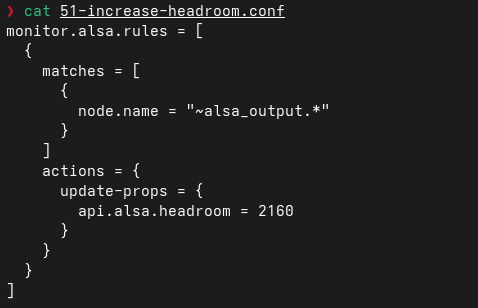
Next in that same folder I added a config file that contained the following:
context.properties = {
    default.clock.rate        = 48000
    default.clock.quantum     = 512
    default.clock.min-quantum = 512
    default.clock.max-quantum = 512
}
I then restarted the wireplumber service by running systemctl –user restart wireplumber or you can reboot the system. Audio should work as exepcted and
Try out this config and see if this fixes your audio issues.