System Details
- Device: Acer Chromebook 14 (CB3-431): Edgar
- OS: ChromeOS 103
- Firmware Type: Stock
- Firmware Version:
- Internal storage type: eMMC
Summary of the Issue
I’m trying to help a friend jailbreak his Acer Chromebook 14 and we removed the write protect screw, put it into developer mode, flashed the iso we want to install to it.
However, when it came to the final step. Using Mr. Chromebox, it had an error and said
“firmware read succeeded, but the image is not a valif cbfs/fmap; cannot continue:”
The log states “the spi flash contents could not be read correctly. You may need to add iomem=relaxed…”
It also says the image is “missing coreboot region”.
Just FYI. Skill wise I’m not the best, I dont understand everything. I do daily drive void, but in this situation I’ve never done.something like this before. Help would be much appreciated thanks 
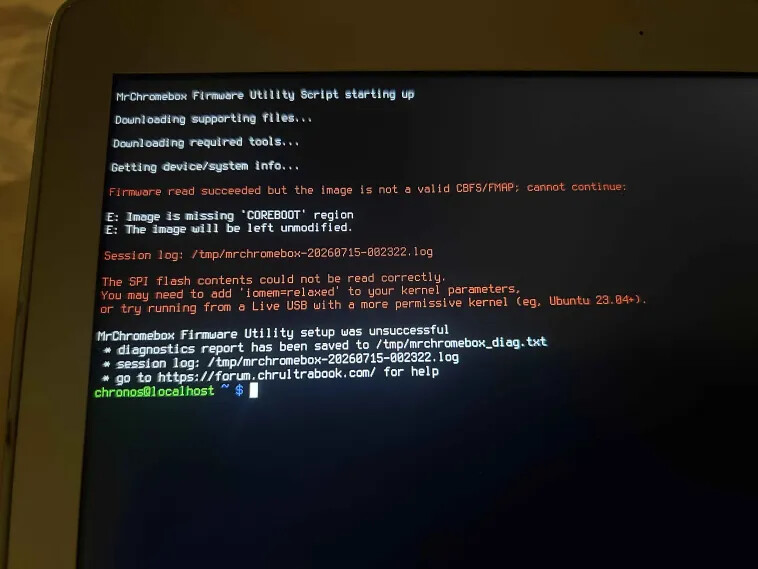
Steps to Reproduce:
-
Unplug battery from motherboard.
-
Hold the power button to discharge residual electricity.
-
Remove write protect screw.
-
Reconnect battery.
-
Turn OS verification off and enter developer mode.
-
Use Mr. Chromebox script.
Expected Behavior:
I’m guessing it shoulud just work and then allow me to boot from my linux USB?