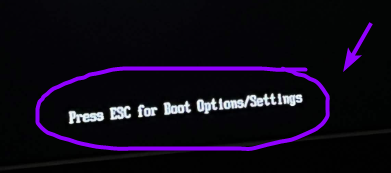
i’m assuming there’s a file somewhere where i could make the text empty, but i’m not sure where that could be unfortunately and that’s why i’m asking here!
i mainly want it to be disabled because i personally know that i can press ESC to enter the BIOS options, so having that text not appear at all makes booting look a lot cleaner :>
I was looking around the edk2 repo and found this segment in the code:
File: edk2/UefiPayloadPkg/Library/PlatformBootManagerLib/PlatformBootManager.c

  if (FixedPcdGetBool (PcdBootManagerEscape)) {
    if (FixedPcdGetBool (PcdSerialTerminalPrintEnabled)) {
      Print (
        L"\n"
        L"    Esc              to enter Setup Option Menu.\n"
        L"    ENTER            to boot directly.\n"
        L"\n"
        );
    } else {
      BootLogoUpdateProgress (
        White,
        Black,
        L"Press ESC for Boot Options/Settings",
        White,
        0,
        0
        );
    }
It fits the EXACT line that I was referring to and I was thinking of changling the line: L"Press ESC for Boot Options/Settings", to L"", or L"\n"
however, i REALLY wanna avoid changing anything like this until i get further confirmation from someone here that this is what i need to be changing or if i should be changing this at all. alright, thanks :>
you could remove that section to remove the text, but in addition to telling you what key to press, it lets you know when the system is ready for input. without it you’re pressing the key and hoping the system is ready, or spamming it like a madman
you could remove that section to remove the text, but in addition to telling you what key to press, it lets you know when the system is ready for input. without it you’re pressing the key and hoping the system is ready, or spamming it like a madman