I was able to successfully uefi my chromebook, and installed windows 10 at first, as that is the only OS that would run on 16gb EMMC. Then I realised that Tiny11 also was possible, and created an windows image of that and was running Tiny11. However, randomly my computer seemed to just shut off, followed by what looked like the OS was running but there was no post or screen background. The computer, recently, turned on again and booted into windows, and I was happy enough and left it again. But again, the device is refusing POST, and does not show anything though HDMI (Which I know that it used to work). Is there a reason this happened, as I notice other people might be experiencing this too (https://www.youtube.com/shorts/1WZedpp5I5o + the comments)? I might just try to switch back to CrOS, if that is the only way, but I enjoy the OS, which takes advantage of even extremely low-spec hardware such as this. Hope this can be revived!
another Q: Would reflashing the bios after going back to ChromeOS fix?
I did also note that the device WOULD TURN ON, as it did once. I thought that it would be fixed after this, but it has went to this again. I am wondering IF it could be a fw issue, because someone else I know has this model, but older, and the device still works very well.
Do you get any signs of life whatsoever? possibilities could be a power/battery LED turning on when plugging in a charger, power/battery LED flickering between amber and white for a moment when EC resetting, etc.
Is your chromebook warming up or getting hot when connected to power? (if it is, unplug it immediately)
Oh! Yes, I am getting a very obvious sign. I forgot to tell, it seems. When the device is low on charge, it will flash red, and when it is fine and the power button is pressed, it will be white (which is signs of the device is turning on and it knows things such as power status (which means that the firmware is controlling the device’s power lights. However again, when the device is seemingly “on,” it doesn’t connect to wifi (which win11 does by default) OR show output on an external display (which win11 usually does).
sorry, that reply seems unclear to me now after re-reading.
are you saying your chromebook gets warm when plugged in but doesn’t do anything while “powered off” or during normal usage? heat during regular usage is normal since your chromebook has passive cooling, not active. It’s fanless.
if the device is warm/hot after plugging in but does nothing (no display, no signs of life), we would have a problem firmware flashing couldn’t fix unless you’re experienced in microsoldering. it could be a short, but i’m not worried about it since your earlier descriptions tell me that your chromebook shows clear signs of life
if you’re comfortable opening your chromebook, check your display connector, battery, and all other ZIF connectors to rule those out.
but aside from that, it doesn’t really seem bricked. potentially just an issue in your installed firmware or so.
in that case… let’s try reflashing your firmware. do you have your suzyq board/cable? if all 3 TTYUSB devices (/dev/ttyUSB*) appear upon plugging the debug cable in, follow the steps at Manually Flashing Firmware | MrChromebox.tech
(please, don’t skip any steps on the guide. though, i’m very sure you know this already.)
i have had your specific device (octopus, fleex) and have had this problem before too weirdly enough, all that went wrong was an issue with flashing my firmware from what i could tell. i think that’s what happened here, but we’ll see
are you saying your chromebook gets warm when plugged in but doesn’t do anything while “powered off” or during normal usage? heat during regular usage is normal since your chromebook has passive cooling, not active. It’s fanless.
Yes, there is a very obvious difference between the ‘power on’ state and the ‘power off’ state. That is, that if you start the computer (which the laptop will do if it is plugged in to power (the led will turn on) OR the lid is opened OR the power button/refresh+power is pressed), it will seemingly turn on and the temperature of the computer will reach its norm in windows 11.
if you’re comfortable opening your chromebook, check your display connector, battery, and all other ZIF connectors to rule those out.
I did:
unplug the battery and hold power button for a while (remove flea power)
reseeated display connector
reseated mouse/kb (no purpose)
check if any pads on the top of the computer are shorted (none)
but aside from that, it doesn’t really seem bricked. potentially just an issue in your installed firmware or so.
This helping my confidence =)
in that case… let’s try reflashing your firmware. do you have your suzyq board/cable? if all 3 TTYUSB devices (/dev/ttyUSB*) appear upon plugging the debug cable in, follow the steps at
I don’t have suzyQ, but i have WSON8 in my chromebook so i don’t have those clips, but i already have a ch341A with me but it has 4 pins that are usually for programming esp32/arduino(manual).
The other dimanche I was able to turn it on correctly, so I plan to first try to turn it on and I am going to revert to the Chromebook ROM and maybe use AltFW before I try UEFI again.
good to hear that about your chromebook as from the description you just have a firmware issue i would think, all signs point toward it. reprogram the bios flash region whichever way you’d like either through a debug board (suzyq) or with the ch341a. the hardware seems to be in good shape, it could just be the firmware.
alright, but this is really not a great experience, more because I don’t have proficiency in manually rewriting bios [this work]. I used the pencil method that is circulating more as an “give me unlocked chromebook” sort of exploit, and it involves shorting 5V and WP to disable (and to do so again to enable), but I left it in disable and used it to install the ROM. The device is still set to enable, so could this do anything? Is there a chance that I can leverage this somehow to reflash without opening case [OR] Using a SuzyQ?
…you used the pencil method? Was your chromebook a managed device..? Pencil method was only a last resort option shown as a very risky way to disabling write protection if all other exploits to unenroll didn’t work.
Well ****, that means that a short in your board is not out of the question. Which diagram or guide did you follow to short the pins out? You weren’t supposed to leave the connection in, you were only supposed to short the pins out temporarily to disable WP, then immediately take it out.
Plus, you can easily disable write protection while in developer mode assuming your device is not a managed chromebook, it ties write protection to the battery sense line. I can confirm this works as I have had your specific device.
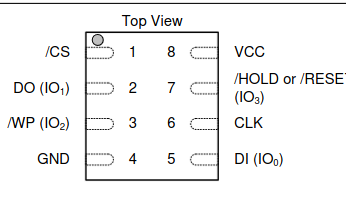
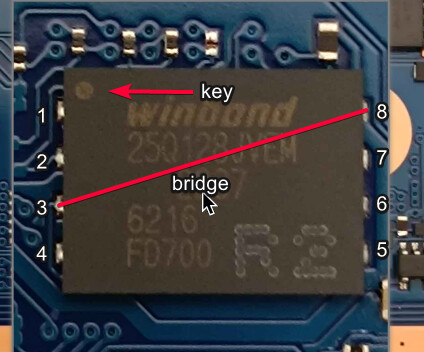
no, my chromebook was NOT a managed device. This is a very common question asked by many when i mention this. I believe that a short might still be out of question, because I don’t remember seeing any ‘magic smoke,’ and the device was successfully rid of WP. I did already tell that I shorted the VCC (Pin8) –> WP (Pin 3) line for 5 seconds allowing the sh1mmer exploit to take control of the rest of the WP disable, I believe.
I will also note that i was seeing this shortly after I ran windows 11 on it, as I was using Windows 10 up to November (after it ended) and the device was very trustworthy.
The images appear to be recent, great. It means you didn’t follow the (incorrect) method where it was believed bridging WP/pin 3 with Ground (pin 4) would work.
Alright, just thought it was managed. Generally, transitioning to devmode and disabling WP by unplugging the battery + (in some cases) using flashrom in VT2 is so much easier and has little to no risk apart from opening the case for battery connector access.
I never thought someone would willingly use the riskiest method possible on a non-managed device, though i’m sure you had your reasons.
Good going on you for not damaging anything in the process like many have.
Regardless, I now think your chromebook’s chances of having a short are little to none.
However…
As for this, you’ll need to open the case. Disabling write protection only allowed you to write to the flash while the system was running or with a suzyQ I believe. Write protection does not matter if you physically have the device and along with that, also have a programmer.
Could you possibly obtain a chip clip for the WSON-8?
Even then, would a SuzyQ even help in this case? It would if you set the GSC to factory mode and/or opened CCD.