System Details
- Device: [Cyan]
- OS: [Ubuntu 24.04]
- Firmware Type: [UEFI Full ROM]
- Firmware Version: [MrChromebox-2512.2-dirty] (dirty because I’ve a logo and the pxe conf compiled)
- Internal storage type: [eMMC]
Summary of the Issue
On version 2509.1 and below
of MrChromebox firmware, I follow the indication in this post
and was able to get my PXE boot menu when plugging in the following usb-to-ethernet adapter
Bus 001 Device 002: ID 0bda:8153 Realtek Semiconductor Corp. RTL8153 Gigabit Ethernet Adapter
I was getting :
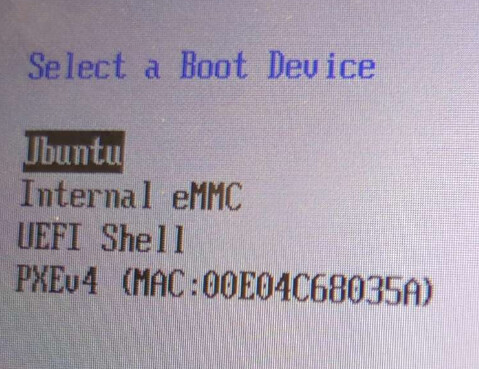
However, on version 2512 and above, I can no longer get the same PXE boot behavior.
I tried using the same configuration by modifying:
CONFIG_FILE=“coreboot/configs/bsw/config.cyan.uefi”
LINE_TO_ADD=“CONFIG_EDK2_NETWORK_PXE_SUPPORT=y”
But the adapter is not shown in the boot menu.
Steps to Reproduce
- Flash MrChromebox firmware version 2512 or newer with the configuration above.
- Plug in the Realtek RTL8153 USB Ethernet adapter.
- Attempt to boot via PXE from the boot menu.
Expected Behavior
The USB Ethernet adapter (RTL8153) should be detected by the firmware and allow PXE booting, as it did in version 2509.1 and earlier.
What would be the correct configuration to use in this file?
“coreboot/configs/bsw/config.cyan.uefi”
Many thanks to MrChromebox for his work and continued support of his firmware.