Hey everyone,
I’m running into a frustrating issue with my Lenovo Flex 5i Chromebook (aka Akemi). I had to disconnect the battery because it swelled up (not burning my whole house), and now my CPU is permanently stuck at 400 MHz when running on just the AC adapter. It should be running at 1.9 GHz but it’s crawling along and basically unusable.
My setup:
-
Lenovo Flex 5i (Akemi)
-
Intel Celeron 5205U @ 1.9 GHz
-
Latest MrChromebox UEFI firmware
-
Xubuntu 24.04 LTS (I had Windows 11 before, it became unusable at 0.4GHz so I installed Linux)
-
No battery (had to remove it - swollen/dangerous)
What I’ve tried so far:
I’ve spent hours troubleshooting with Google and Claude, I tried basically everything possible:
-
Changed CPU governor to performance mode - no change
-
Manually set minimum CPU frequency to max - didn’t work
-
Tried forcing the driver (intel_pstate) settings (min_perf_pct to 100, etc) - nothing
-
Disabled intel_pstate entirely and tried using acpi-cpufreq - it didn’t even load it.
-
Used ectool to check the EC - it sees AC power fine, no power limits set
-
Tried disabling BD_PROCHOT through MSR registers - still stuck at 400MHz
-
Updated to the latest firmware - still the same issue
The EC shows AC is connected (ac = 1) and there’s no power limiting active (that’s what ectool chargestate says). Temps are fine (20-37°C). The system just refuses to let the CPU go above 400 MHz without a battery connected.
Current state I set it to:
-
Governor is set to “performance”
-
CPU frequency is locked at 400 MHz
-
Max frequency shows 1900 MHz (so it knows it CAN go higher)
-
intel_pstate driver param min_perf_pct stuck at 21%
Is this just how it is with Chromebooks running on AC only? Does the EC have some hardcoded safety thing that won’t let it run at full speed without a battery?
I get that it’s probably a safety feature, but there’s gotta be some way around this right? I don’t really want to buy a new battery as it’s just not worth the money.
Thanks for any help!
-
you don’t need to bump after a day
-
how are you determining that the CPU is stuck at 400MHz?
powertop shows mine between 1.1 - 1.9 GHz
I checked the frequency in many ways, here’s some I tried:
cat /sys/devices/system/cpu/cpu*/cpufreq/scaling_cur_freq - showed 400000 always
watch -n 1 “grep MHz /proc/cpuinfo” - watched the cpu freq too, always 400 mhz
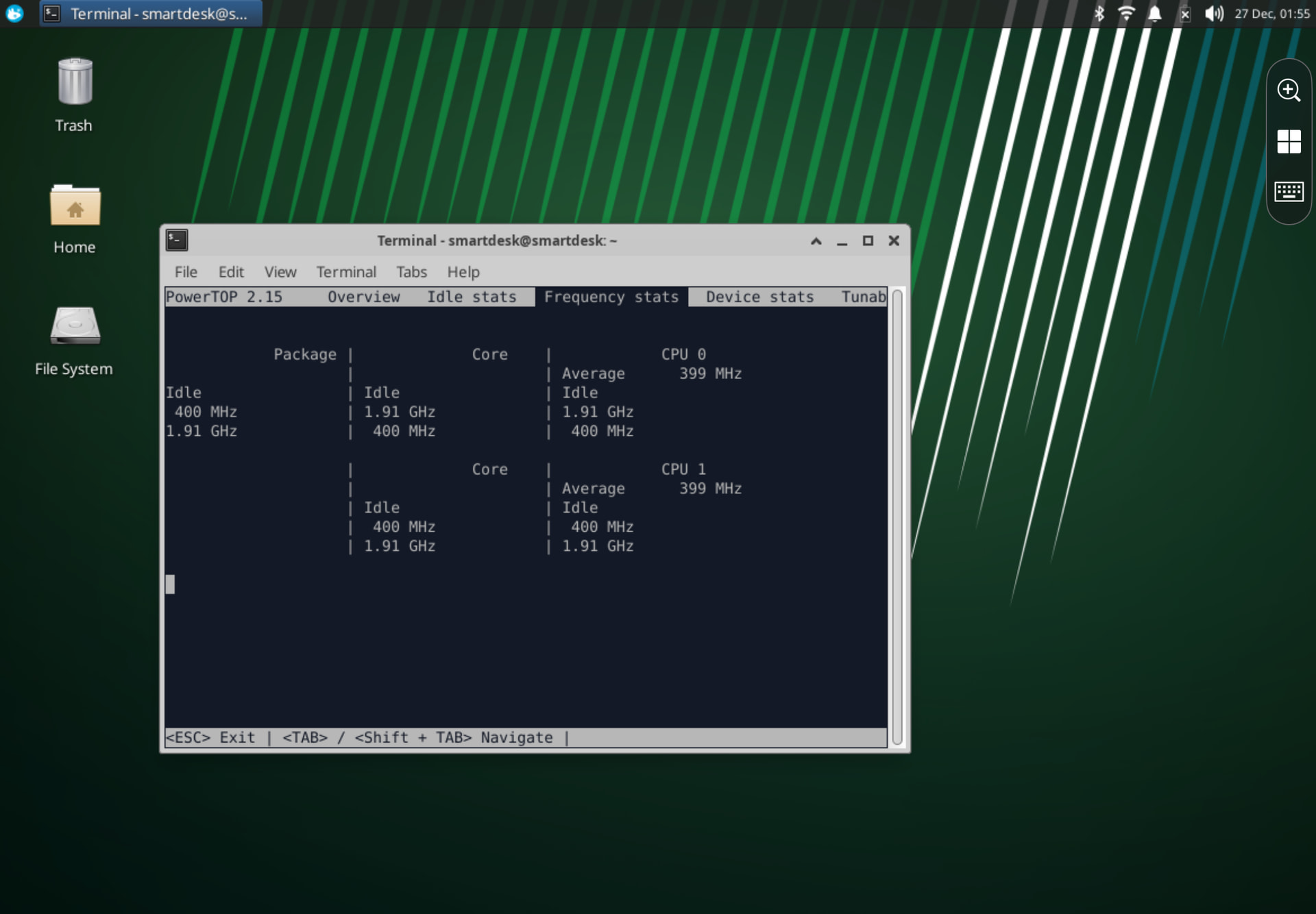
I also installed and tried powertop as you said, and it shows my CPU averaging 399 MHz. The system definitely feels significantly slower than it did before I removed the battery, simple tasks now are slow, which made me to investigate this in the first place.
The powertop output shows the CPU package can theoretically reach 1.91 GHz, but it’s stuck at the minimum 400 mhz even under load. Or maybe i just don’t understand powertop
I must have missed the no battery part. would have to dig in to find why the CPU is limited. could be the OS doing it, because coreboot has no clue if you have a battery or not
Yeah, had to remove the battery - it swelled up.
I’ve tried a bunch of things on the OS side, and now I’m lost.
Ectool shows AC connected fine (ac=1, 3000mA input, no power limits set).
CPU still stuck at 400 mhz. Pretty sure it’s not the OS though - I had Windows 11 on here before and Task Manager showed the same 0.4 GHz issue without the battery.
Could you help me where else to look? Could the EC be limiting things even though coreboot doesn’t care about the battery?
I’m on Xubuntu 24.04 with your latest firmware, did an update the same day as installed xubuntu.
it looks like the EC might be asserting PROCHOT when there is no battery present, due to the behavior of the charge controller. You should be able to check/verify that from the OS
Okay, I checked the registry for prochot
rdmsr 0x1FC - it’s 0x84500d, prochot is being asserted
So yeah, looks like the EC is asserting PROCHOT without the battery. Is there any way to override this, or would I need to modify the EC firmware or something else?
you would need modified EC firmware, yes
Any chance theres a modified EC firmware available for Akemi or would I need to do it myself? Although I don’t think I’ll be able to do it myself…
you’re already running my custom EC firmware.
you would need a custom EC build along with a custom coreboot build to update it
Would you be able to make a custom EC build that skips the PROCHOT check? I don’t think I’d be able to do it myself
send me a DM or msg me on Discord/IRC and I’ll send you a build to try
I tried adding mrchromebox on Discord, it says that you don’t accept friend requests. My discord: offbeatraptor
Or just disable sw sync and update it with flashrom
We solved the problem, a new build for the public will be made by MrChromebox soon, so this won’t be a problem for anyone else. Huge thanks to him.