Can this laptop be converted to run Linux? I want to install Q4OS (Debian based). I entered developer mode but could never get it to boot from my flash. Do I need some sort of firmware before this is possible? When the system attempted to boot, I was told it did not contain Chrome OS. So I think I am missing something.
Either dual boot with ChromeOS, which isn’t recommended since your device is past it’s end of life
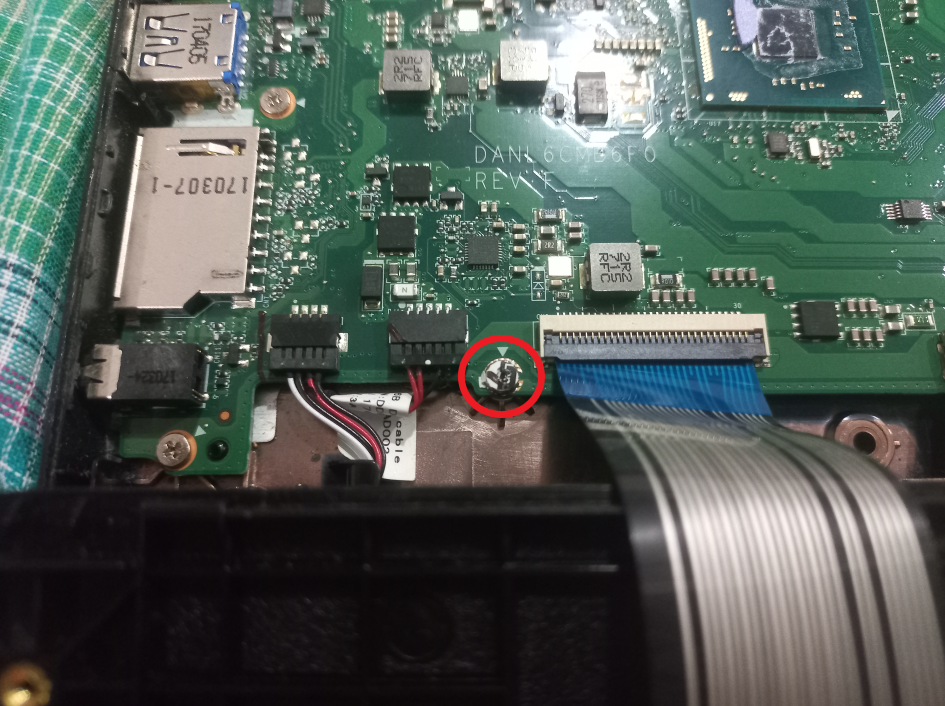
Or overwrite ChromeOS completely, by flashing full UEFI firmware, then installing Linux. This method requires you to disable ahrdware write protection - which for your device means removing a screw on the motherboard https://docs.mrchromebox.tech/images/wp/Reks_wp_screw.png
MrChromebox’s site is pretty simple to follow. Once the screw is removed, running the firmware script is pretty simple as well, as there are on screen instructions to guide you
Thank you. I can now get into developer mode. With Control-Alt-F2 I can get to terminal. I can login as chronos (no password). I can download and run the script with:
Now, I hit a wall. This machine has reached EOL status and no longer supports RW_Legacy mode. Next step is to remove the RW-WP screw on the motherboard. That will allow me to install the UEFI Full ROM firmware. Another wall:One case screw is stripped and will need to be drilled.
That-t-ts all folks. I will give another progress report later.